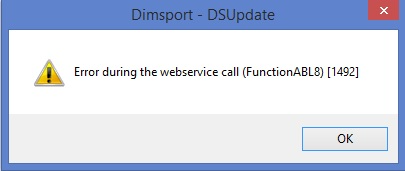
DoHo-Flasher (My Genius) – Fehler 1492: „Error during the webservice call“ beim Update
My-Genius-Fehler 1492 beim Geräte-/Software-Update: mögliche Ursachen sind blockierte ABL-Autorisierungen, keine Verbindung zu den Dimsport-Servern, veraltete Software/GOS, Firewall/Antivirus, nicht erreichbarer Mirror oder korrupte FTDII-/SD-Karten-IDs – Internetverbindung prüfen, Update durchführen, Schutzsoftware deaktivieren, Mirror wechseln, sonst Master kontaktieren.
Symptom
Dieser Fehler tritt beim Update des My-Genius-Geräts bzw. der Software auf.
Ursache
Es gibt mehrere mögliche Gründe:
1. My-Genius-Tool mit blockierten ABL (Autorisierungen).
2. Die Software erreicht die Dimsport-Server nicht.
3. Veraltete Software-Version.
4. Firewall/Antivirus/Antimalware/Proxy/Antispyware usw. blockiert den Zugriff auf die Dimsport-Server.
5. Mirror nicht erreichbar.
6. Virgin-My-Genius-Tool ohne Autorisierungen.
7. My-Genius-Tool mit altem GOS (Genius Operating System).
8. FTDII und SD-Karten-CID (die ID-Nummern der USB-Schnittstelle bzw. SD-Karte) sind korrupt (sie entsprechen nicht den Originalen).
Lösung
1. Internetverbindung prüfen, eine andere Verbindung oder einen mobilen Hotspot verwenden.
2. Ein Update des My-Genius-Geräts/der Software durchführen.
3. Firewall/Antivirus/Antimalware/Proxy/Antispyware usw. deaktivieren.
4. Den Mirror wechseln, wie hier beschrieben: https://reserved.dimsport.com/kb/Article.aspx?id=1136
Falls die vorgeschlagenen Lösungen nicht funktionieren, den Master kontaktieren.
My Genius error 1492 during device/software update: possible causes are blocked ABL authorisations, no connection to Dimsport servers, obsolete software/GOS, firewall/antivirus, unreachable mirror or corrupted FTDII/SD card IDs – check the internet connection, perform an update, disable protection software, change the mirror, otherwise contact your Master.
Symptom
This error occurs when updating your My Genius device/software
Cause
There are several reasons:
• My Genius tool with blocked ABL (authorizations).
• The software can't reach Dimsport servers.
• Obsolete software version.
• Your firewall/antivirus/antimalware/proxy/antispyware etc. is blocking the access to Dimsport servers.
• Mirror not reachable.
• Virgin My Genius tool with no authorizations.
• My Genius tool with old GOS (Genius Operating System)
• FTDII and SD Card CID (respectively the ID number of the USB interface and SD Card) are corrupted (they don't correspond to the original ones)
Solution
• Check your internet connection, change it with a new one or use a mobile hotspot
• Perform an update of your My Genius device/software.
• Disable your firewall/antivirus/antimalware/proxy/antispyware etc.
• Change the Mirror as the following https://reserved.dimsport.com/kb/Article.aspx?id=1136 .
If the proposed solutions don't work, contact your Master