DoHo-Flasher (My Genius) – Reset-Prozeduren (Fälle 1–5)
Übersicht aller My-Genius-Reset-Prozeduren: Reset ohne erfolgreiches MOD-Flashen (mit/ohne Markenwechsel, unbekannte ECU), Reset nach erfolgreichem Schreiben (Code/Gegencode), erzwungener Reset mit Unlock Credit inkl. Recovery-Fall sowie Markenwechsel und falsche Protokollauswahl (Case 5).
Die My-Genius-Einheit kann auf mehrere Arten zurückgesetzt werden. Nachfolgend die verschiedenen Ausgangslagen und die durchzuführenden Schritte.
Fall 1 – Reset OHNE ersten erfolgreichen Reflash der MOD-Datei:
a) eigenständig ohne Markenwechsel (ohne Unlock Credit).
Wenn das My Genius ein Fahrzeug zum ersten Mal liest, es aber NICHT mit einer MOD-Datei flasht (Status: 0055-0077-0299-02DD) und der Kunde ein weiteres Fahrzeug derselben Marke lesen möchte, kann die Einheit einfach über die entsprechende Funktion im Menü zurückgesetzt werden.
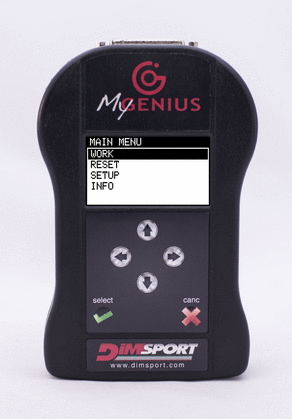
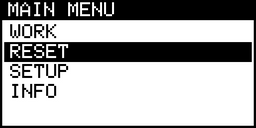
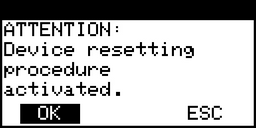
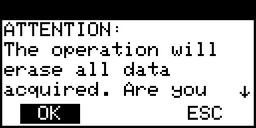
Diese Operation kann der Kunde eigenständig durchführen. Keine Aktionen durch den Manager erforderlich.
b) mit Markenwechsel (ohne Unlock Credit).
Wenn das My Genius ein Fahrzeug zum ersten Mal liest, es aber NICHT mit einer MOD-Datei flasht, und der Kunde ein zweites Fahrzeug einer anderen Marke lesen möchte (oder die Marke der Einheit wechseln will, ohne je die Datei gelesen zu haben – Status: 0055-0077-0299-02DD), muss die Funktion „Brand Change Request“ durchgeführt werden ( Anleitung: https://reserved.dimsport.com/kb/Article.aspx?id=762 ).
c) unbekannte ECU.
Wenn das My Genius eine Softwarenummer liest, die noch nicht in der Dimsport-Datenbank enthalten ist, erscheint die Meldung „unknown Ecu“. Das passiert, wenn die auf dem Fahrzeug identifizierte Software noch nicht in den .csv-Dateien enthalten ist ( Anleitung: https://reserved.dimsport.com/kb/Article.aspx?id=829 ).
Fall 2 – Reset nach erfolgreichem Schreiben (ohne Unlock Credit):
Ausgangslage: Fahrzeug erfolgreich mit der MOD-Datei geflasht.
Wenn das Fahrzeug zur Wartung beim Händler ansteht, flasht der Kunde vorher die Originaldatei (Stock-Datei) zurück. Während des Service wird das Steuergerät vermutlich mit einer aktualisierten Softwareversion neu geflasht. Der Kunde versucht anschließend (ohne zu wissen, ob die ECU eine neue Software erhalten hat), die MOD-Datei erneut zu flashen. Das My Genius warnt, dass die Datei nicht mehr kompatibel ist. Da sich die Einheit im Status WRITE (03DD) befindet, muss das My Genius über eine Code-/Gegencode-Prozedur zurückgesetzt werden, um wieder mit dem Steuergerät zu kommunizieren und die neue Stock-Datei zu lesen ( Anleitung: https://reserved.dimsport.com/kb/Article.aspx?id=765 ).
Fall 3 – Erzwungener Reset (mit Unlock Credit):
a) Ausgangslage: Fahrzeug erfolgreich mit der MOD-Datei geflasht.
Gleiches Szenario wie oben; da sich die Einheit im Status WRITE (07DD) befindet, muss das My Genius über einen ERZWUNGENEN Reset (FORCED reset) zurückgesetzt werden, um wieder mit dem Steuergerät zu kommunizieren und die neue Stock-Datei zu lesen ( Anleitung: https://reserved.dimsport.com/kb/Article.aspx?id=768 ).
b) Recovery:
Unabhängig von der Ausgangslage: Schlägt das Schreiben der MOD-Datei ins Fahrzeug fehl, befindet sich die My-Genius-Einheit im Status RECOVERY (0266/0366). Der Kunde kann nur den Manager über das aufgetretene Problem informieren und ihm die generierten LOG-Dateien senden. Der Manager leitet die LOG-Dateien zusammen mit der STOCK- und der MOD-Datei an den technischen Support von Dimsport weiter. Der Reset-Credit wird dem Manager abhängig von der Ursache des Schreibfehlers gewährt: Ergibt die Analyse der LOG-Dateien, dass das Problem vom Kunden oder von den vom Manager erstellten Dateien verursacht wurde, wird der Reset-Credit dem Manager berechnet. Wurde das Problem hingegen vom Gerät (einschließlich der Protokolle) verursacht, erhält der Manager den Reset-Credit gebührenfrei. Weitere Details in den folgenden Anleitungen:
CLIENT – https://reserved.dimsport.com/kb/Article.aspx?id=1386
MASTER – https://reserved.dimsport.com/kb/Article.aspx?id=1387
Fall 4 – Markenwechsel (Brand Change):
a) Ausgangslage: Fahrzeug erfolgreich mit der MOD-Datei geflasht (mit Unlock Credit).
Entscheidet sich der Kunde, das My Genius an einem anderen Fahrzeug zu verwenden und das erste modifiziert zu lassen, ist das wie der Kauf einer zweiten Einheit – er muss dann den „Brand Change Request“ durchführen ( Anleitung: https://reserved.dimsport.com/kb/Article.aspx?id=769 ).
b) Ausgangslage: Fahrzeug erfolgreich mit der MOD-Datei geflasht (ohne Unlock Credit).
Möchte der Kunde sein My Genius an einem anderen Fahrzeug verwenden, muss er zuerst die Stock-Datei in das Fahrzeug zurückflashen und danach den „Brand Change Request“ durchführen. Diese Prozedur ist unabhängig davon, für welche Marke die Einheit neu konfiguriert wird ( Anleitung: https://reserved.dimsport.com/kb/Article.aspx?id=771 ).
Fall 5 – Es wurde das falsche Protokoll ausgewählt (ohne Unlock Credit):
Wenn bei der Standard-Leseprozedur das richtige Modell und der richtige Typ ausgewählt wurden, das My Genius die ECU-Software aber nicht erkennen kann, startet es die manuelle Auswahlprozedur. Das My Genius zeigt eine entsprechende Meldung und bietet eine Liste möglicher Protokolle für das Lesen/die Identifikation an. Es kann mehrere mögliche Protokolle geben – den Manager nach dem richtigen fragen oder sie nacheinander ausprobieren. Wählt der Kunde beim manuellen Lesen das falsche Protokoll, muss das My-Genius-Tool vor jedem neuen Leseversuch ZURÜCKGESETZT werden.
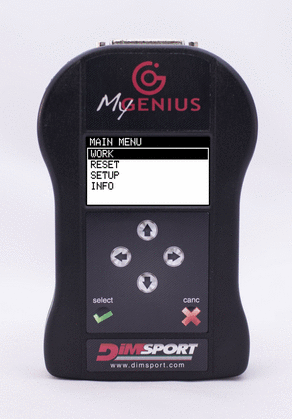
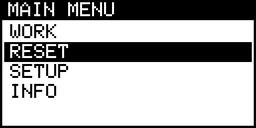
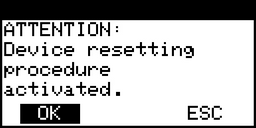
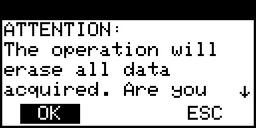
Nach dem Klick auf OK ist das My Genius bereit für eine Leseprozedur – bitte mit dem Manager klären, welches Protokoll für dieses Fahrzeug das richtige ist.
Overview of all My Genius reset procedures: reset without a successful MOD reflash (with/without brand change, unknown ECU), reset after successful writing (code/counter-code), forced reset with Unlock Credit including the recovery case, plus brand change and wrong protocol selection (case 5).
The My Genius unit can be reset in multiple ways. Here below the different conditions and operations to perform.
Case 1 - Reset WITHOUT first successful reflash of the MOD file: a) autonomously without Brand change (without Unlock Credit). If the My Genius reads for the first time a vehicle but DOES NOT reflash it with a Mod file (status: 0055-0077-0299-02DD ) and the client wants to read another vehicle of the same brand, the unit can simply be reset through the specific function available in the menu.
This operation can be performed autonomously by the client. No operations required by the Manager.
b) with Brand change (without Unlock Credit). If the My Genius reads a vehicle for the first time but DOES NOT reflash it with a Mod file and the client wants to read a second vehicle of a different Brand (or wants to change Brand on the unit without ever having read the file - status: 0055-0077-0299-02DD ), the function Brand Charge Request has to be performed ( Click HERE to view the guide https://reserved.dimsport.com/kb/Article.aspx?id=762 ). c ) unknown ECU . If the My Genius reads a software number not yet included in the Dimsport database, it will return the message "unknown Ecu". This condition occurs when the software identified on the vehicle is not yet included in our .csv files ( Click HERE to view the guide https://reserved.dimsport.com/kb/Article.aspx?id=829 ). Case 2 - Reset after successful writing (without Unlock Credit): The starting condition is: vehicle successfully reflashed with the MOD file.
When the vehicle is scheduled for servicing at the dealership, the Client, before leaving the vehicle to the dealer, reflashes the stock file back to it. During the service, the ecu of the vehicle is likely to be reflashed with an updated software version. The Client (although not knowing if the Ecu has been reflashed with an updated software) tries to reflash the ecu with the Mod file. The My Genius warns the client that the file is no longer compatible. Being the unit status WRITE ( 03DD ), in order to communicate again with the Ecu and read the new stock file present in the vehicle, the My Genius will need to be reset via a code/counter-code procedure ( Click HERE to view the guide https://reserved.dimsport.com/kb/Article.aspx?id=765 ).
Case 3 - Forced Reset (with Unlock Credit): a) the starting condition is: vehicle successfully reflashed with the MOD file.
When the vehicle is scheduled for servicing at the dealership, the Client, before leaving the vehicle to the dealer, reflashes the stock file back to it. During the service, the ecu of the vehicle is likely to be reflashed with an updated software version. The Client (although not knowing if the Ecu has been reflashed with an updated software) tries to reflash the ecu with the Mod file. The My Genius warns the client that the file is no longer compatible. Being the unit status WRITE ( 07DD ), in order to communicate again with the Ecu and read the new stock file present in the vehicle, the My Genius will need to be reset via a FORCED reset ( Click HERE to view the guide https://reserved.dimsport.com/kb/Article.aspx?id=768 ) .
b) Recovery: Independently from the starting condition, should the writing of the MOD file to the vehicle fail, the My Genius unit will be in the status RECOVERY ( 0266/0366 ). The Client can only notify the Manager of the problem occurred and send him the LOG files generated. The Manager will then forward the LOG files together with STOCK and MOD files to the Dimsport Technical Support.The Reset credit is granted to the Manager in function of what has generated the writing failure. After the analysis of the LOG files, if the problem was either caused by the Client or by the files created by the Manager, the Reset Credit will be charged on the Manager. On the other hand, if the problem was generated by the device (including protocols) the Reset Credit will be granted to the Manager without any fee. For more details see the guides below.
CLIENT - Click HERE to view the guide https://reserved.dimsport.com/kb/Article.aspx?id=1386
MASTER - Click HERE to view the guide https://reserved.dimsport.com/kb/Article.aspx?id=1387
Case 4 -
Brand Change: a)
the starting condition is: vehicle successfully reflashed with
the MOD file
(with Unlock credit)
.
If the Client decides to use the My Genius on another vehicle leaving the first one
modified is like he had purchased a second unit, he must then perform the Brand
Change Request
(
Click HERE to view the guide https://reserved.dimsport.com/kb/Article.aspx?id=769
)
.
b)
the starting condition is: vehicle successfully reflashed with
the MOD file
(without Unlock credit)
.
If the Client wants to use his My Genius on a different vehicle, he must first
reflash the vehicle with the stock file and then perform the action Brand Change
Request.
This procedure does not depend on the Brand the unit will be reconfigured for (
Click HERE to view the guide https://reserved.dimsport.com/kb/Article.aspx?id=771
).
Case 5 - It has been selected the wrong protocol (without Unlock credit)
.
If during the standard reading procedure you selected the correct model and type but the My Genius
is not able to recognize the ECU software it will start the manual selection procedure.
My Genius gives a specific message and offers a list of possible protocols for the reading/identification
procedure.
The possible protocols to try can be more than one, contact your manager to have information about the correct one or just try them one at the time.
If the client chooses the wrong protocol for the manual reading
before any new reading attempt it will be necessary to RESET the My Genius tool
.
After clicking on OK button, My Genius will be ready for a reading procedure, please verify with the Manager which is the correct protocol to be used on this vehicle.