DoHo-Flasher (My Genius) – Logdateien exportieren
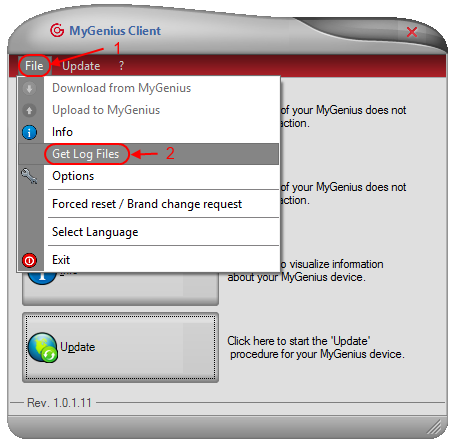
Logdateien vom My Genius exportieren: „File → Get Log Files“ klicken, Dateien einzeln oder alle auswählen – die Software erstellt automatisch eine LOG.cab-Datei mit den exportierten Logs.
So werden Logdateien aus dem My-Genius-Tool extrahiert:
1. Auf „File → Get Log Files“ klicken.
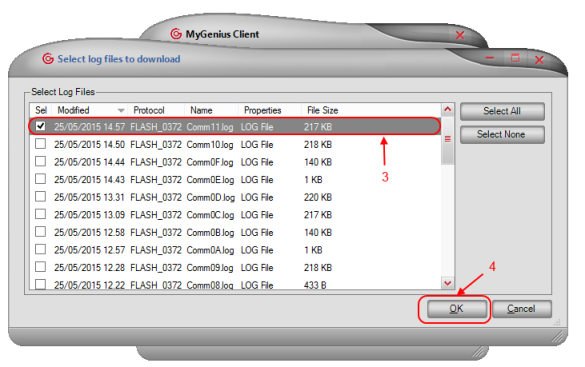
2. Jede Datei einzeln manuell auswählen oder auf die folgende Schaltfläche klicken,

um alle auf dem Tool gespeicherten Logdateien auszuwählen.
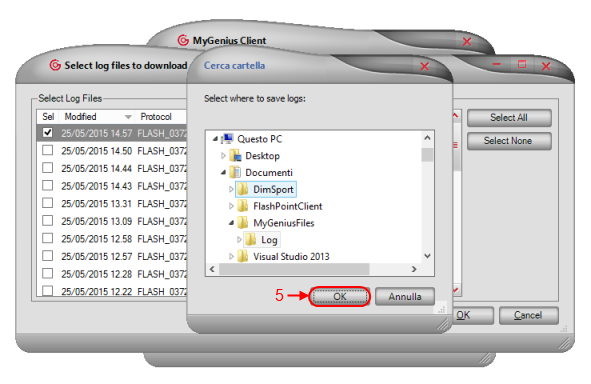
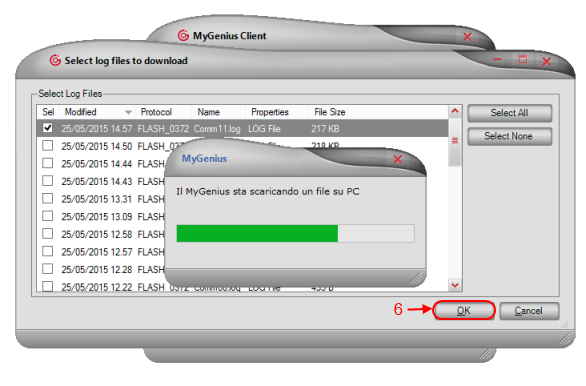
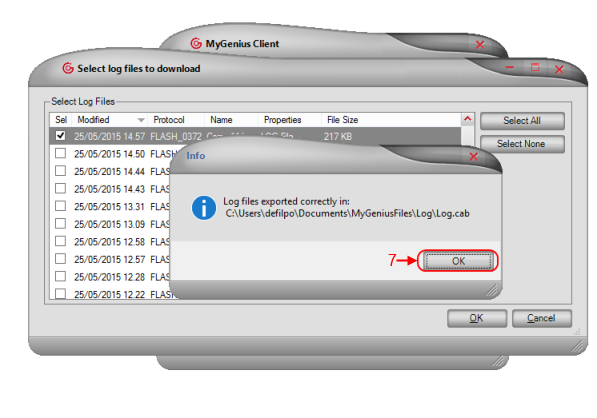
3. Die Software erstellt automatisch eine LOG.cab-Datei mit den exportierten Logdateien.
Export log files from the My Genius: click 'File → Get Log Files', select individual files or all of them – the software automatically creates a LOG.cab file containing the exported logs.
Follow the steps below on how to extract log files from your My Genius tool
• Click on "File -> Get Log Files"
• Select manually every single file or click on
button to select all log files saved to your tool
• The software will automatically create a LOG.cab file containing the log files exported.