DoHo-Flasher (My Genius) – Status des Geräts ermitteln (Statuscodes-Übersicht)
Zwei Wege, den Status des My Genius zu ermitteln (My Genius Client → Info → Status Info oder am Gerät über MAIN MENU → INFO → PROTOCOL INFO) mit Erläuterung der wichtigsten Statuscodes: VIRGIN, INITIALIZE, CONFIGURED, WRITE und RECOVERY.
Es gibt zwei Möglichkeiten, den Status des My-Genius-Geräts zu ermitteln: über die My-Genius-Client-Software oder direkt am Gerät.
P.S.: Die wichtigsten STATUS-Werte und ihre Bedeutung sind am Ende dieses Artikels aufgeführt.
MY GENIUS CLIENT SOFTWARE
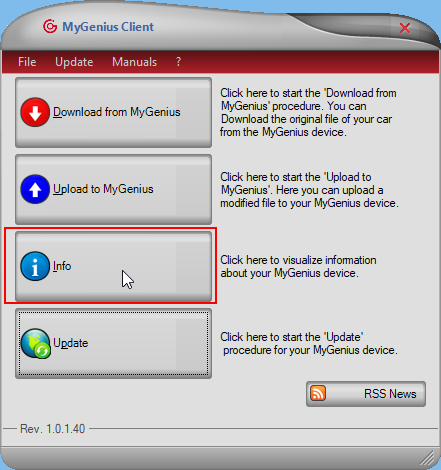
1. Die „My Genius Client“-Software starten und auf „Info“ klicken.
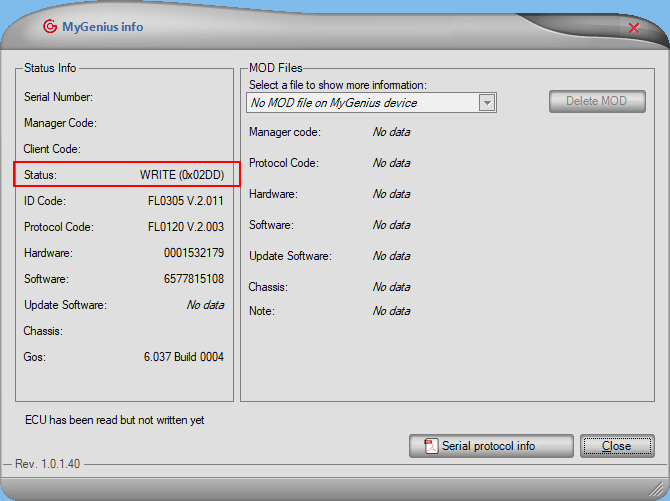
2. Der Status erscheint links im Bereich „Status Info“.
MY GENIUS TOOL
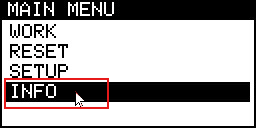
Im „MAIN MENU“ „INFO“ und dann „PROTOCOL INFO“ auswählen – dort wird der „STATE“ des Tools angezeigt.
WICHTIGSTE STATUS-WERTE
VIRGIN 0x0000 ⇒ Das Gerät ist für keine Operation freigeschaltet. Es kann auch die Meldung „there is not any valid features“ als STATE angezeigt werden (siehe Link https://reserved.dimsport.com/kb/article.aspx?id=703 ). In diesem Fall muss der Master das Tool vor dem Versand an den Kunden initialisieren, wie hier erklärt: https://reserved.dimsport.com/kb/Article.aspx?id=630
INITIALIZE 0x0044 ⇒ Das Gerät wurde vom Master initialisiert, ist aber noch nicht einsatzbereit. Der Kunde muss das erforderliche Pflicht-Update durchführen. Falls keine Warnmeldung zu einem Pflicht-Update erscheint, diese Prozedur in der My-Genius-Client-Software befolgen: https://reserved.dimsport.com/kb/Article.aspx?id=1259
CONFIGURED 0x0055 ⇒ Das Gerät ist konfiguriert und einsatzbereit. Das Gerät mit dem Fahrzeug verbinden und eine „ID“ oder ein „READING“ durchführen.
WRITE 0x02DD ⇒ Das Gerät hat das Fahrzeug gelesen und ist bereit, eine MOD-Datei zu schreiben.
WRITE 0x07DD ⇒ Das Gerät hat eine MOD-Datei in das Fahrzeug geschrieben.
WRITE 0x03DD ⇒ Das Gerät hat die ORI-Datei (Originaldatei) im Fahrzeug wiederhergestellt.
RECOVERY 0x0266/0x0366 ⇒ Das Gerät hat das Schreiben der MOD-/ORI-Datei in das Fahrzeug nicht abgeschlossen.
Two ways to find out the status of the My Genius (My Genius Client → Info → Status Info, or on the device via MAIN MENU → INFO → PROTOCOL INFO) with explanation of the main status codes: VIRGIN, INITIALIZE, CONFIGURED, WRITE and RECOVERY.
There are two ways to find out the status of your My Genius device. From the My Genius Client software and directly from the device.:
P.S. The main 'STATUS' and their meanings will be listed at the end of this article.
MY GENIUS CLIENT SOFTWARE
• Run the 'My Genius Client software' and click on 'Info'.
• You will see the status within the 'Status Info' section on the left.
MY GENIUS TOOL
From the 'MAIN MENU', select 'INFO', 'PROTOCOL INFO' and you will see the 'STATE' of your tool.
MAIN STATUS
VIRGIN 0x0000 ⇒ the device is not enabled to perform any operations. You may also see the message 'there is not any valid features' as the STATE of the device (see the link https://reserved.dimsport.com/kb/article.aspx?id=703 ). In this case, the Master has to initialize the tool before shipping it to the customer as explained here https://reserved.dimsport.com/kb/Article.aspx?id=630 .
INITIALIZE 0x0044 ⇒ the device has been initialized by the Master, but it's not ready to work. The customer has to perform the required mandatory update. If no warning message about a mandatory update appears, follow this procedure in the My Genius Client software https://reserved.dimsport.com/kb/Article.aspx?id=1259
CONFIGURED 0x0055 ⇒ the device is configured and ready to work. Connect the device to your vehicle and make an 'ID' or 'READING'.
WRITE 0x02DD ⇒ the device has read the vehicle, and is ready to write a MOD file.
WRITE 0x07DD ⇒ the device has written a MOD file in the vehicle.
WRITE 0x03DD ⇒ the device has restored the ORI file in the vehicle.
RECOVERY 0x0266/0x0366 ⇒ the device has not completed the writing of the MOD/ORI file in the vehicle.