Dimsport – New Genius: Geschwindigkeit ändern
Bei manchen Steuergeräten muss die Arbeitsgeschwindigkeit des New Genius auf „langsam“ gestellt werden – über das Schraubenzieher-Symbol oben rechts im Menü mit den Optionen ID, READING und TOOL.
Bei manchen Steuergerätetypen kann es notwendig sein, die Arbeitsgeschwindigkeit des New Genius zu ändern. Dazu den Genius mit dem Fahrzeug verbinden und zum Menüpunkt gehen, der die Optionen ID, READING und TOOL anbietet. Dann auf das Schraubenzieher-Symbol oben rechts auf dem Genius-Bildschirm drücken. In diesem Menü kann die Geschwindigkeit auf „langsam“ gestellt werden. Standard ist immer „schnell“. Die Lese- und Schreibvorgänge dauern dann länger als üblich – das ist normal.
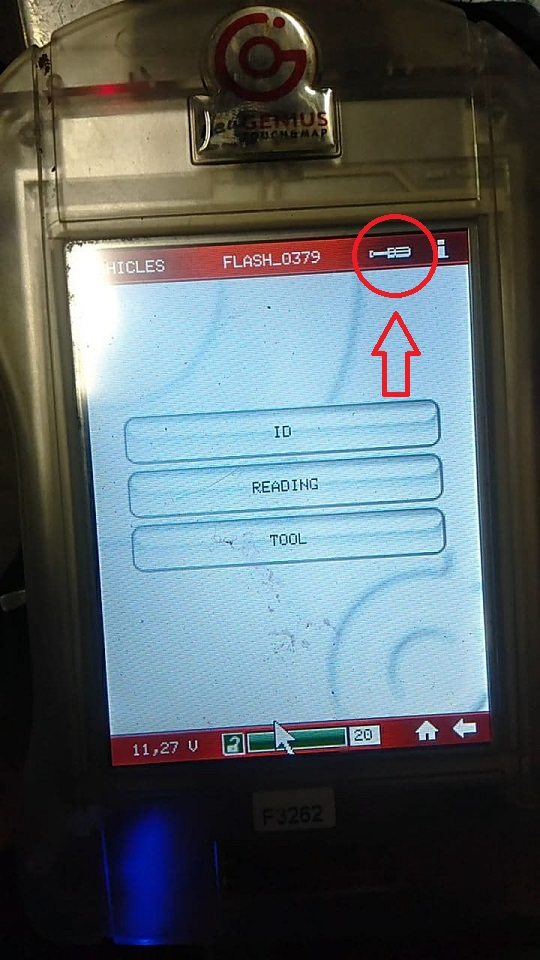
On some ECU types the New Genius working speed must be set to slow – via the screwdriver icon at the top right in the menu offering the options ID, READING and TOOL.
On some ECU types it might be necessary to change the speed the New Genius is working at. In order to do this you connect the Genius to the vehicle and go to the menu point where it gives you the options ID, READING and TOOL. Then press the Screwdriver Icon on the top right of the Genius screen. In this menu you will be able to set the speed to slow. The default is always fast. The Reading and Writing procedures will then take longer than usual but this is normal.