Dimsport – Flashpoint: Backup vom alten PC erstellen und auf neuem PC neu installieren
Anleitung zum Sichern der Flashpoint-Daten (integrierte Backup-Funktion ab Version 7.06.519 Build 456 oder manuell: \\Race2000, \\FPFILE, DSRace.mdf) und zur Neuinstallation der Software auf einem neuen PC inkl. Wiederherstellung der ECU-Historie.
Backup und Neuinstallation der FlashPoint-Software
WICHTIG: Vor der Deinstallation der Software sicherstellen, dass eine Kopie des aktuellen FlashPoint-System-Setups vorliegt (beim zuständigen Manager anfordern). Alle Daten der bisher bearbeiteten Steuergeräte sichern und FlashPoint neu installieren.
Hinweis: Ab Version 7.06.519 Build 456 verfügt Flashpoint über eine neue Funktion, mit der sich einfach ein Backup erstellen lässt. Wir empfehlen, das Backup auf einem USB-Stick zu speichern.
Flashpoint-Backup-Funktion
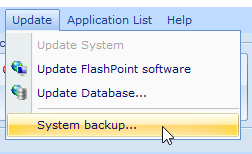
1) Auf „Update“ klicken und dann „System Backup“ auswählen.
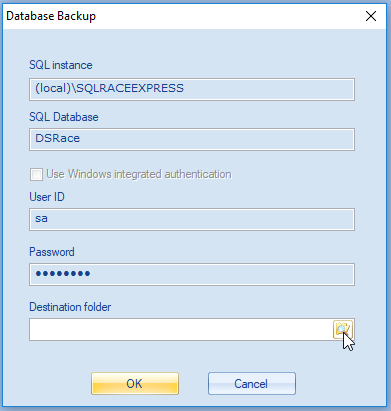
2) Den Zielordner für das Backup auswählen und mit „Ok“ bestätigen.
Manuelle Backup-Prozedur
P.S.: Die Flashpoint-Software MUSS vor einem manuellen Backup GESCHLOSSEN werden.
Ein vollständiges Backup des gesamten Ordners \Race2000 auf einem externen Medium erstellen (CD-ROM, USB-Stick oder externe Festplatte). Unbedingt den Ordner \FPFILE und die Datei „DSRace.mdf“ sichern.
Neuinstallation der Flashpoint-Software
1) Wird derselbe PC verwendet: FlashPoint deinstallieren und den Ordner \Race2000 manuell entfernen (auch aus dem Papierkorb löschen). Bei einem anderen PC weiter mit Schritt 2.
2) Die aktuelle Version des FlashPoint-Systems installieren (beim Manager anfragen).
3) FlashPoint nach der Installation NICHT starten.
4) Aus dem Backup den Ordner \FPFILE und die Datei „DSRace.mdf“ in den neuen FlashPoint-Installationsordner (\Race2000) kopieren.
5) FlashPoint starten und wie gefordert nach Software-Updates und der ECU-Datenbank suchen (der PC muss mit dem Internet verbunden sein; dies kann einige Minuten dauern). Damit ist FlashPoint neu installiert und arbeitet mit den zuvor verwalteten Steuergeräten.
Hinweis: Falls aus irgendeinem Grund kein Backup erstellt werden konnte, kann die Datenbank jederzeit über den Manager wiederhergestellt werden:
Im Race Manager: Menü „Modify“ → „Send client's files history“
Im Flashpoint Client: Menü „Modify“ → „Import selected file history“
Guide for backing up Flashpoint data (built-in backup feature from version 7.06.519 build 456 or manually: \\Race2000, \\FPFILE, DSRace.mdf) and reinstalling the software on a new PC, including recovery of the managed ECU history.
Backup and reinstall FlashPoint software
IMPORTANT: before unistalling software, be sure to have a copy of the latest setup of FlashPoint System (you have to request it to your Manager). Backup all your data of the previous ECU managed and reinstall FlashPoint:
N.B. From the version 7.06.519 Build 456, it has been implemented a new feature of Flashpoint that will allow making easily a backup. We suggest saving your backup to a USB flash drive.
Flashpoint backup feature 1) Click on "Update" and then select "System Backup"
2) Choose the destination folder where you want to save your backup and then click on "Ok" button.
Manual backup procedure P.S. Flashpoint software MUST BE CLOSED before making a manual backup. Perform a full backup of whole \Race2000 folder on an external support like a Cd-Rom, an Usb flash drive or an external hard disk. Be careful to backup \FPFILE folder and the file "DSRace.mdf" Reinstallation of the Flashpoint software
1) If you are using the same PC, uninstall FlashPoint and manually remove \Race2000 folder (remember to remove it from the trash bin too). If you are using a different PC go to step 2.
2) Install the latest copy of FlashPoint System (ask your Manager).
3) DO NOT run FlashPoint after the installation.
4) From your backup, copy the \FPFILE folder and the file "DSRace.mdf" into the new FlashPoint installation folder (\Race2000).
5) Run FlashPoint and check for software update and for ECU database as required (your PC must be connected to internet, it may takes a few minutes). Now your FlashPoint is reinstalled and working with your previous managed ECUs. N.B. If for any reason it was not possible to make a backup , you can always recover the database by contacting your Manager:
From Race Manager: menu Modify --> Send client's files history
From Flashpoint Client: menu Modify --> Import selected file history