Dimsport – NewTrasdata: Zugangspunkt kann nicht gefunden werden (Access point cannot be found)
Die Trasdata-Software startet nicht und meldet, dass der Zugangspunkt nicht gefunden werden kann – Lösung: unter C:\Program Files (x86)\Common Files\DimSport\DSUpdate die Datei DSUpdate.exe ausführen.
Zugangspunkt kann nicht gefunden werden
Symptom
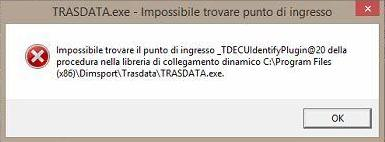
Die Trasdata-Software startet nicht und zeigt den Fehler:
Ursache
Die Trasdata-Software kann die richtige Datei zum Öffnen nicht finden.
Lösung
Zu C:\Program Files (x86)\Common Files\DimSport\DSUpdate wechseln und DSUpdate.exe ausführen.
The Trasdata software does not open and reports that the access point cannot be found – solution: run DSUpdate.exe from C:\Program Files (x86)\Common Files\DimSport\DSUpdate.
Access point cannot be found
Symptom the
Trasdata software does not open and shows the error:
Cause the
Trasdata software cannot find the correct file to open.
solution
Go to C: \ Program Files (x86) \ Common Files \ DimSport \ DSUpdate and run DSUpdate.exe.